

Choose email notifications
Choose which notifications also arrive in your mailbox, so you learn about an alarm or an offline device without having Cytometa Cloud open.
Nobody gets email until they subscribe. Every account starts with all 14 types switched off, including Alarm triggered. Check your preferences in every workspace you are responsible for.
-
Select the bell () in the header, then View all notifications.
-
Under Email Preferences, turn on the switch next to each type you want by email. Turn off the ones you do not want.
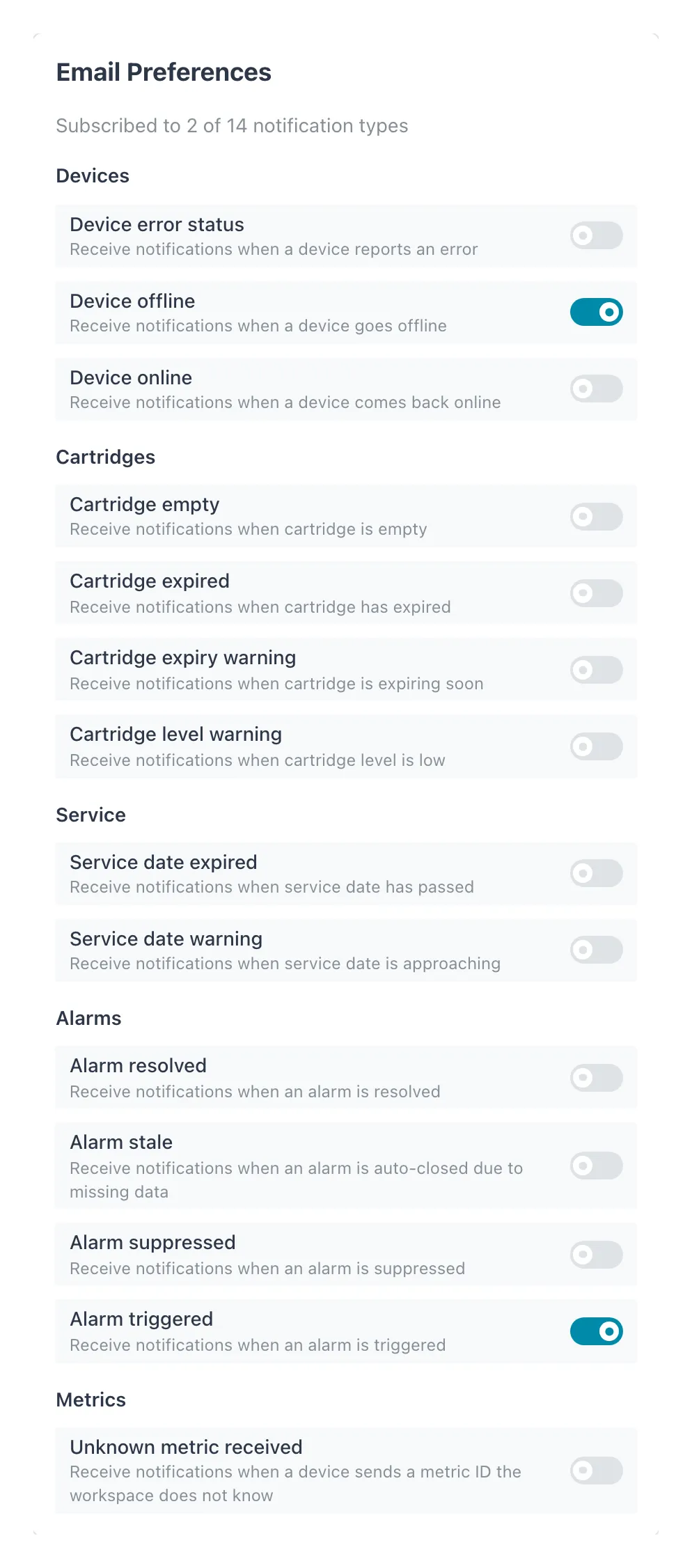 Two types are switched on, so the count reads “Subscribed to 2 of 14 notification types”.
Result: each switch saves immediately. The message Subscriptions saved appears, and the count at the top changes, for example Subscribed to 3 of 14 notification types. There is no save button.
The notification types
Section titled “The notification types”The types are grouped as on screen:
| Group | Types |
|---|---|
| Devices | Device error status, Device offline, Device online |
| Cartridges | Cartridge empty, Cartridge expired, Cartridge expiry warning, Cartridge level warning |
| Service | Service date expired, Service date warning |
| Alarms | Alarm resolved, Alarm stale, Alarm suppressed, Alarm triggered |
| Metrics | Unknown metric received |
When each one is sent is explained under Notifications.
A sensible starting set
Section titled “A sensible starting set”| You are | Switch on |
|---|---|
| On call or responsible for water quality | Alarm triggered, Alarm stale, Device offline, Device error status |
| Responsible for the instruments (usually a Manager) | The above, plus Cartridge level warning, Cartridge empty, Cartridge expiry warning, Cartridge expired, Service date warning, Service date expired and Unknown metric received |
| Supervising a team | Alarm triggered, Alarm suppressed and Alarm resolved, to follow what happens to each alarm |
| Reading reports only (Viewer) | Nothing, or Alarm triggered |
Device online and Alarm resolved are good news. They are useful for someone on call waiting for a recovery, but noise for everyone else.
- Per workspace. Preferences apply to the workspace you are in. Switch workspace and set them there as well.
- Personal. Your switches affect only your own email. Nobody can subscribe on your behalf.
- Every role. Viewers, Operators, Managers and Admins can all subscribe.
- Email goes to the address you sign in with. There is no separate notification address.
- Losing access ends the email. When you are removed from a workspace, your subscriptions there are removed too.
If it does not work
Section titled “If it does not work”| What you see | What to do |
|---|---|
| Failed to save subscriptions. Please try again. | The switch goes back to where it was. Check your connection and try again. |
| You are subscribed but receive nothing | Check that the notification appears in the inbox, then check your spam folder. Email is only sent for notifications created after you subscribed. |
Related
Section titled “Related”- Notifications — the inbox and what each type means
- Create an alarm
- Set up your account