

Cytometa Cloud v26.8
Released June 6, 2026.
This release adds remote access to an instrument’s own web interface, next to the screen access you already had. Sigrist Sicon transmitters can now be read over HTTP. Organization administrators see each router’s firmware, and users without two-factor authentication get a reminder on the Dashboard.
NewRemote access to web interfaces
Section titled “Remote access to web interfaces”What changed. A device page now has a Web interface button next to Remote control. Web interface opens the instrument’s own web page inside Cytometa Cloud; Remote control shows its screen (VNC), as before. The connection runs through the site’s router (gateway), so you need no VPN and no separate access to the site network.
The session opens in a full-screen window with a countdown. It lasts 60 minutes, and closing the window ends it. The buttons appear only when the device is online and the router has found that kind of interface on the instrument.
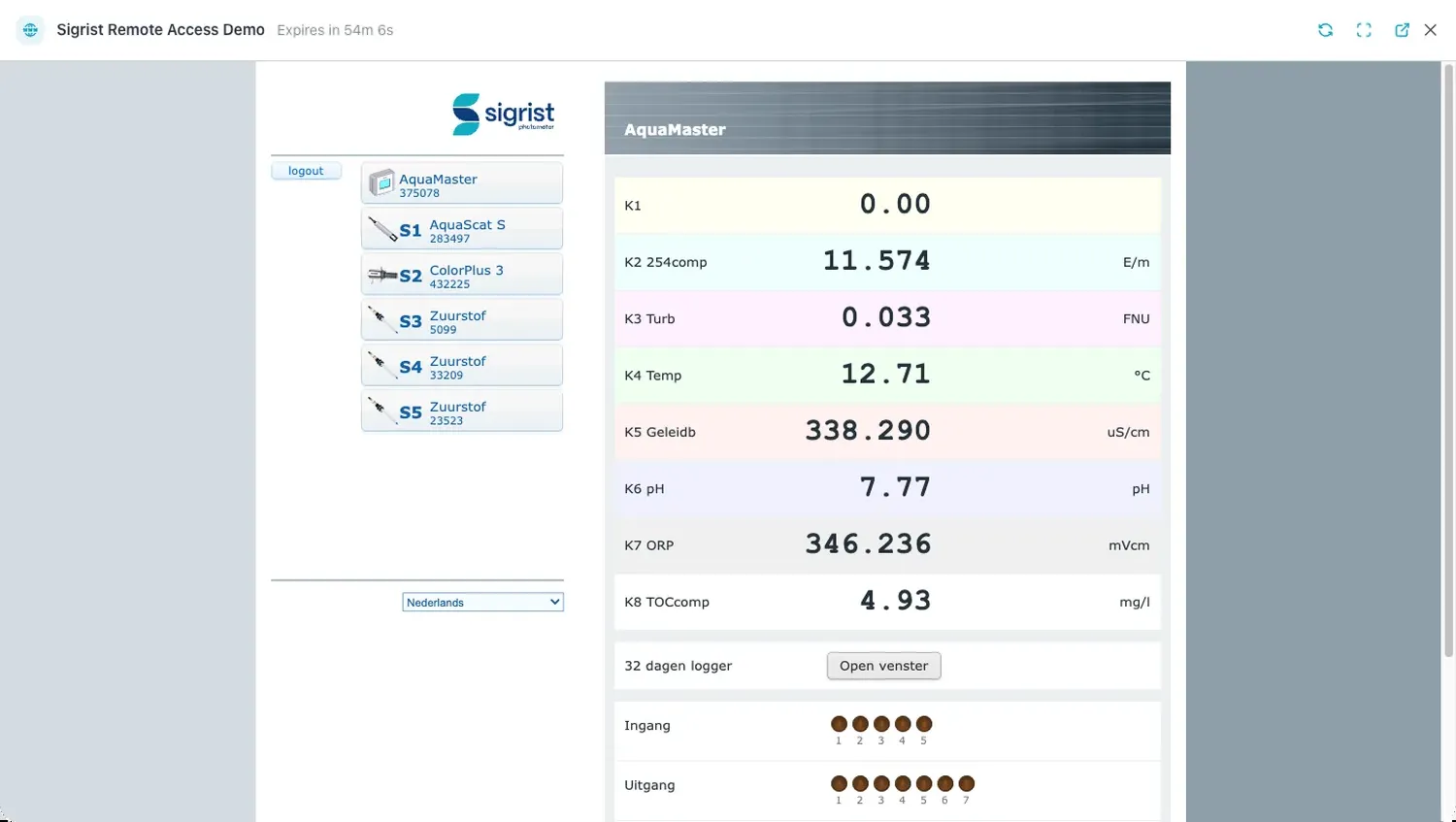 The web interface of a Sigrist AquaMaster, opened with Web interface: the transmitter’s own
page, with its sensors and live values, in your browser. The bar above shows the device and the
time left; reload, full screen, open in a new tab and close are on the right.
The web interface of a Sigrist AquaMaster, opened with Web interface: the transmitter’s own
page, with its sensors and live values, in your browser. The bar above shows the device and the
time left; reload, full screen, open in a new tab and close are on the right.
Why it matters. You can check an instrument’s settings or read its log from the office, without driving to the site or setting up network access.
Who it is for. Operators, Managers and Admins. Viewers do not see the buttons.
Read more:
NewSigrist Sicon over HTTP
Section titled “Sigrist Sicon over HTTP”What changed. A Sicon’s Configuration now has a Transport setting: Modbus, as before, or HTTP. With HTTP, the router reads the transmitter’s web interface, using the Web access code you enter. It takes each channel by the name set on the instrument, so you do not map channels to metrics by hand. A channel name that is not yet a metric in the workspace appears under pending metrics, where you map it to an existing metric or create a new one.
Why it matters. Channels come from the instrument itself, so a channel added or renamed on the transmitter does not need to be mapped again in Cytometa Cloud. When you switch an existing Sicon from Modbus to HTTP, its values may arrive under new metric IDs. Map them to the old metrics so the series keep their history.
Who it is for. Managers and Admins, who configure devices.
Read more:
ImprovedRouter firmware version
Section titled “Router firmware version”What changed. The Routers table has a Firmware column with each router’s firmware version.
Why it matters. When a service provider or Cytometa support asks which firmware a router runs, you can read it off the screen instead of going to the site.
Who it is for. Organization administrators, under Settings › Organization Settings › Routers.
Read more:
ImprovedTwo-factor authentication reminder
Section titled “Two-factor authentication reminder”What changed. When two-factor authentication is off for your account and your organization does not require it, the Dashboard shows a banner, Protect your account. Enable 2FA takes you to your Profile to set up an authenticator app. Remind me later hides the banner for 7 days in that browser.
Why it matters. An account that controls alarms and remote access to instruments is worth protecting with more than a password.
Who it is for. Every user who has not turned on two-factor authentication.
Read more: