

Devices
A device is the record of one physical instrument at a site: a Bactosense, a Sigrist Sicon, AquaMaster or AquaScat 2, an ATi Metrinet, an s::can con::line or a Cytometa FlowControl. Devices lists every device in the workspace, shows at a glance which ones are running, and opens a page per device with its status, its latest values and its error history.
Open it from Devices in the left navigation.
The device list
Section titled “The device list”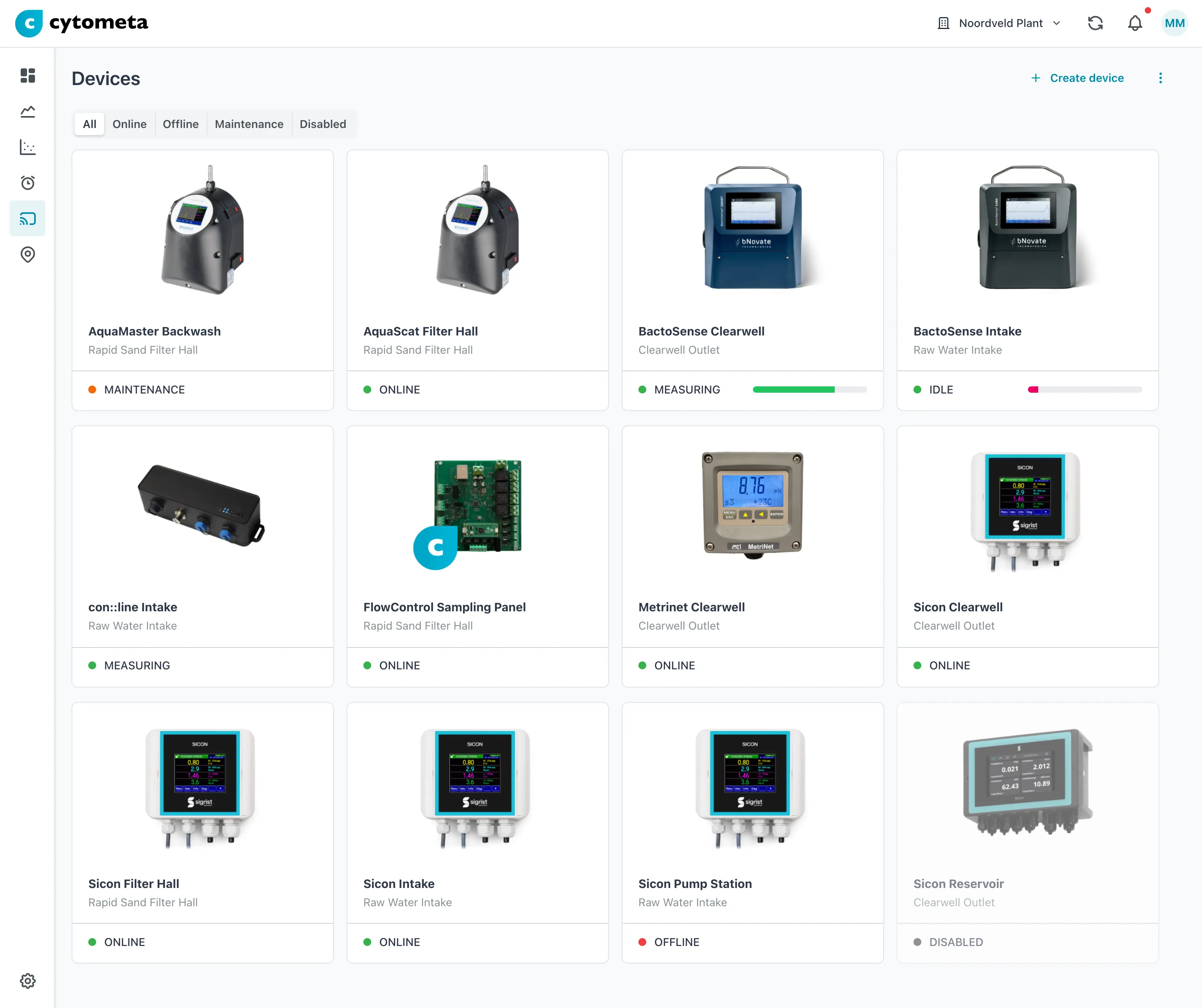 The state is at the bottom of each card. A Bactosense or con::line shows the status text the instrument sends instead of Online; a Bactosense also shows its cartridge level.
From top to bottom:
- Create device — adds a device. Shown to Managers and Admins only. See Create a device.
- The menu (⋮) with Refresh, which reloads the list at once. The list also refreshes by itself every 60 seconds. Managers and Admins also see New devices on your network; see Add discovered devices.
- The filter: All, Online, Offline, Maintenance, Disabled. Online and Offline show only devices in the Active state; a device in Maintenance or Disabled appears only under its own filter and under All. The filter is kept in the page address, so a bookmarked or shared link opens with the same filter.
- One card per device: the instrument’s picture, the device name, its location, a colored dot with the status, and — for a Bactosense that is online — a bar with the cartridge level (hold the pointer over it for the exact percentage; the bar turns red below 25 %).
Disabled devices are shown dimmed. Select a card to open the device page. On a phone the cards become compact rows with the picture beside the name.
What the status means
Section titled “What the status means”Each card shows one status. When more than one applies, the first one in this table wins:
| Status | Meaning |
|---|---|
| Disabled | Someone set the device to Disabled. It is out of use and is not linked to its instrument. |
| Maintenance | Someone set the device to Maintenance mode, typically during a service visit. Its connection state is not shown. |
| Offline | The device is Active but Cytometa Cloud has stopped hearing from it. |
| Error | FlowControl only: the device is online and reports an error. See its Error History. |
| (instrument’s own text) | Bactosense and con::line only: the device is online and reports its own status, which is shown word for word as the instrument sends it. |
| Online | The device is Active and connected. |
Maintenance and Disabled are states that a person sets; see Change a device’s state. Online, Offline and Error come from the instrument and its router.
The device page
Section titled “The device page”The page refreshes by itself every 30 seconds, except while the Edit device dialog is open. What it shows beyond the parts below depends on the type of instrument — see Supported devices.
Header
Section titled “Header”The device name, a back arrow, and on the right:
-
Web interface and Remote control — open the instrument’s own web page or screen. They appear only when you may use them and the device supports them; see Open remote access. On a phone they move into the ⋮ menu.
-
The menu (⋮):
Item Who sees it What it does Refresh Everyone Reloads the page now. Edit Manager, Admin Opens Edit device. See Edit a device. Delete Manager, Admin Deletes the device. Only works when it is Disabled. See Delete a device. Set state › Active, Maintenance mode, Disabled Manager, Admin Changes the state. The current state is left out of the list. See Change a device’s state.
Cards on every device page
Section titled “Cards on every device page”- The device card, as in the list.
- Details — Type (brand and model), Serial number, MAC address and Last seen (for example Just now, 5m ago, 3h ago, 2d ago). Last seen is hidden while the device is in Maintenance or Disabled. It is the first thing to check when you suspect data has stopped: it tells you when rather than whether.
- Metric values — one card per tag, with the most recent value of every metric this device measured in the last 7 days, and how long ago it was measured. Series without a value in the last 7 days are left out; if none has one, the page says No recent metrics. View all opens Metrics with these series plotted over the last 7 days.
Cards that depend on the type
Section titled “Cards that depend on the type”| Card | Shown for | Described on |
|---|---|---|
| Status | Bactosense, con::line, FlowControl — once the instrument has sent it | Bactosense, s::can con::line, Cytometa FlowControl |
| Cartridge | Bactosense, when a cartridge is inserted | Bactosense |
| Flow Control | FlowControl, while it is online | Cytometa FlowControl |
| Error History | Bactosense and FlowControl, when there are errors | the two device pages; the columns differ per type |
Who can do what
Section titled “Who can do what”| Viewer | Operator | Manager | Admin | |
|---|---|---|---|---|
| See the list and device pages | ✓ | ✓ | ✓ | ✓ |
| Open Web interface and Remote control | ✓ | ✓ | ✓ | |
| Create, edit, delete, set state, configure | ✓ | ✓ |