

Cytometa FlowControl
A Cytometa FlowControl does three things: it keeps the pump at a target flow (Flow Regulation), it switches the instrument between up to four water flows on a fixed daily schedule (Flow Switching), and it reads up to four 4–20 mA sensors (Analog Sensors). It can also tell a Bactosense at the same location when to measure, prime and clean.
On the device page
Section titled “On the device page”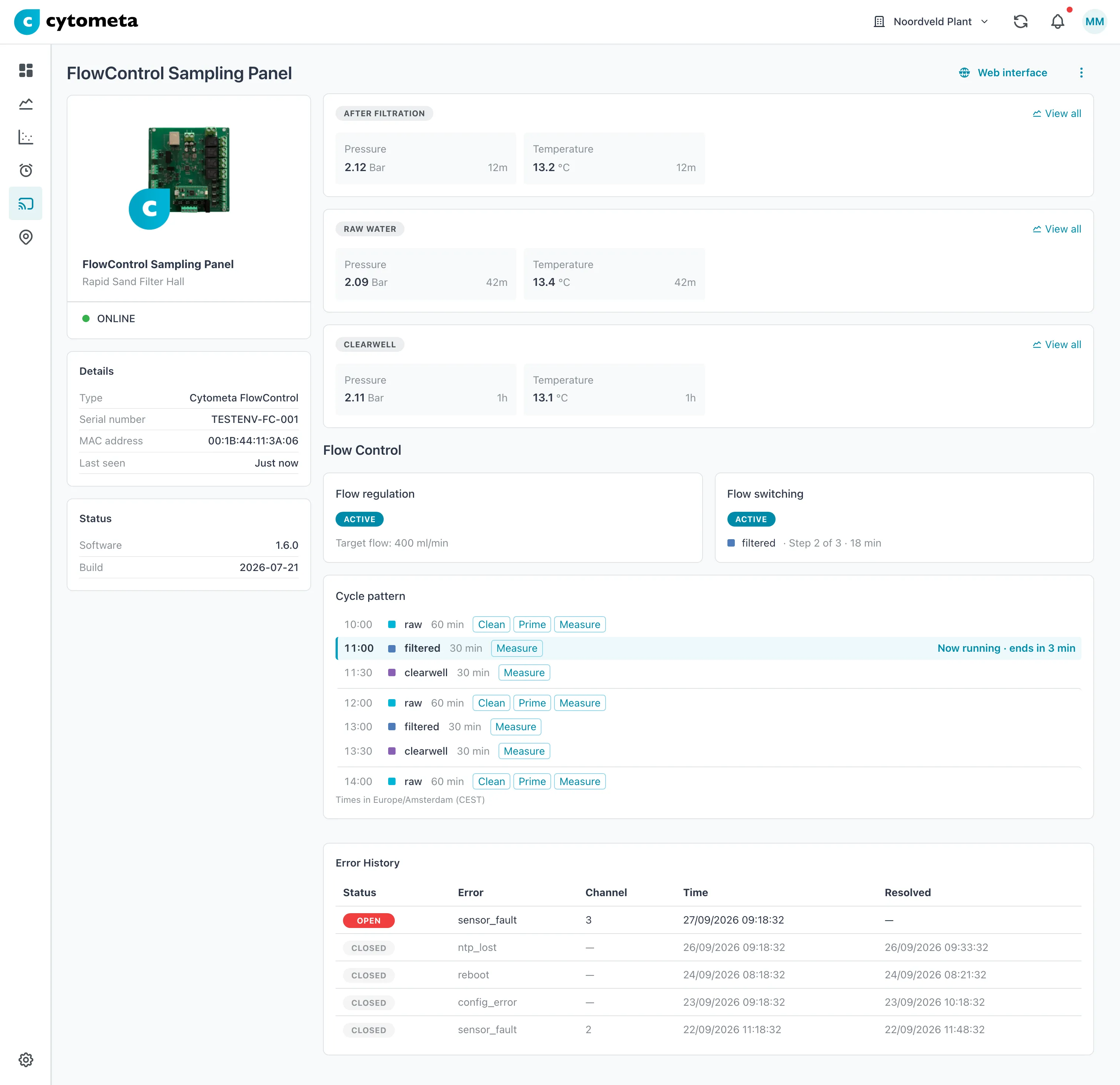 Values are grouped by the flow they were measured on. The cycle pattern marks the step running now and when it ends.
In the device list, a FlowControl that is online but reports an error shows Error.
Status — Software and Build.
Flow Control — only while the FlowControl is online:
- Flow regulation — Active or Inactive, and the Target flow in ml/min.
- Flow switching — Active or Inactive, the flow that runs now (its tag, or Flow 1 to Flow 4), and while switching is active Step n of m and the minutes left in the step.
- Cycle pattern — the schedule as a list of start times: the step before the current one, the current one (highlighted, with Now running · ends in n min) and the next five, each with its flow, duration and Bactosense actions. Shown when flow switching is enabled.
The Cycle pattern counts the steps from midnight UTC, as the FlowControl does, and shows the start times in the workspace’s time zone, named below the list.
Error History — only shown when the unit has reported errors. The newest come first:
| Column | Meaning |
|---|---|
| Status | Open — the problem is still there. Closed — it has been resolved; the row is dimmed. |
| Error | The error code, for example sensor_fault or ntp_lost. |
| Channel | The analog channel involved, or — when it concerns the whole device. |
| Time | When the error opened. |
| Resolved | When it closed, or — while it is open. |
An open entry at the top is the one to act on.
Configure a FlowControl
Section titled “Configure a FlowControl”Before you start, know which flows the valves switch between and which tag each flow should be filed under. Existing tags are in Manage tags; you can also create one while you work.
-
In the left navigation, open Devices and select the FlowControl.
-
Open the menu (⋮) and select Edit.
-
Select the Configuration tab.
-
Set Flow Regulation (see below).
-
Under Flow Switching, add the flows with Add flow, build the schedule with Add step, and set the Settle time.
-
Under Analog Sensors, add a row per sensor with Add sensor.
-
Select Save. The button stays disabled until you change something and every error on the tab is solved.
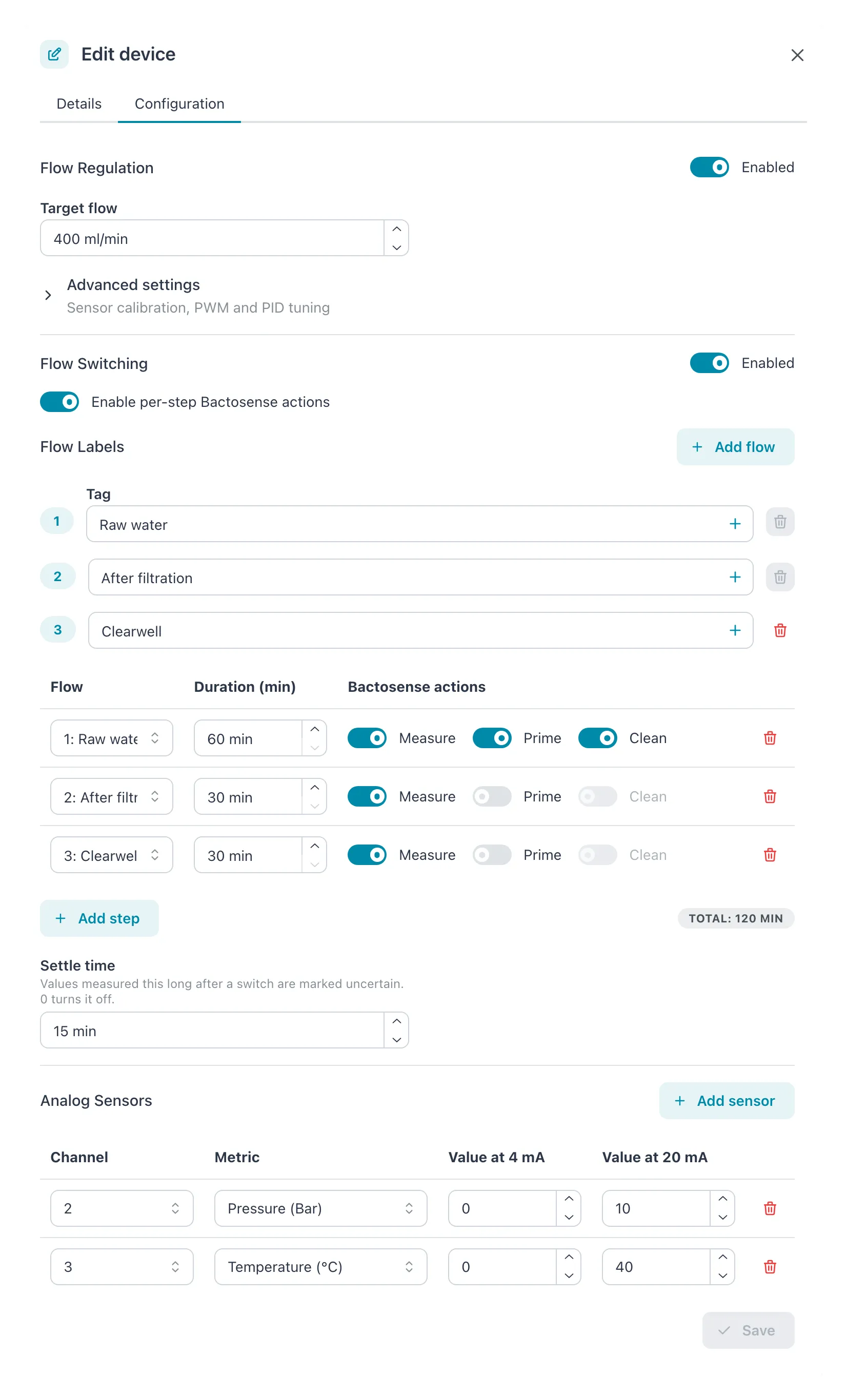 Each flow has a tag, and each schedule step says which Bactosense actions run: only the raw-water step cleans and primes. Values from the first 15 minutes after a switch are marked as uncertain. Pressure and temperature sensors are on analog channels 2 and 3.
Result: the message Settings updated successfully appears and the dialog closes. The router passes the new settings on to the FlowControl, and the device page shows the new Cycle pattern.
The tab has no Cancel of its own. If you close the dialog or switch tabs with unsaved changes, the app asks first; see Edit a device.
Flow Regulation
Section titled “Flow Regulation”| Field | Allowed values | Default | What it does |
|---|---|---|---|
| Enabled | On or off | Off | Lets the FlowControl drive the pump to the target flow. |
| Target flow | 0 to 3000 ml/min | 400 ml/min | The flow to hold. |
Advanced settings (sensor calibration, PWM and PID tuning) opens more fields. Change them only when the pump or flow sensor calls for it; the defaults suit the standard hardware.
| Field | Allowed values | Default | What it does |
|---|---|---|---|
| Analog start (4 mA) | 0 to 2400 ml/min | 0 | The flow the sensor reports at 4 mA. |
| Analog end (20 mA) | 600 to 3000 ml/min, above Analog start | 3000 | The flow the sensor reports at 20 mA. |
| PWM frequency | 1 to 20000 Hz | 1200 Hz | The pump drive frequency. |
| Minimum duty cycle | 0 to 100 % | 0 % | The lowest pump power. |
| Maximum duty cycle | 0 to 100 %, at least Minimum duty cycle | 100 % | The highest pump power. |
| PID gains › Kp, Ki, Kd | Numbers, up to 4 decimals | 0.05, 0.01, 0 | How fast and how firmly the controller corrects. |
While regulation is enabled, analog channel 1 carries the flow sensor. It cannot be used under Analog Sensors.
Flow Switching
Section titled “Flow Switching”| Field | What it does |
|---|---|
| Enabled | Runs the schedule. When on, the schedule needs at least one step. |
| Enable per-step Bactosense actions | Adds the Bactosense actions column to the schedule, so each step can tell the Bactosense at this location to measure, prime or clean. |
Flow Labels. Each flow is one water stream the valves can select. Select Add flow to add one, up to four. Flows are numbered 1 to 4 in the order you add them. For each flow, choose a Tag: measurements and samples taken while this flow runs are filed under that tag, so each stream gets its own series. To create a tag here, select the button (+) beside the field. A tag used for a flow must be 1 to 16 characters, lowercase, without spaces. Only the last flow can be removed (); schedule steps that used it are left without a flow and are marked red until you choose another.
The schedule. Each row is one step; the steps run from top to bottom and then start over. Select Add step to add one, up to 16.
| Column | What to enter |
|---|---|
| Flow | Which flow runs during the step. |
| Duration (min) | How long it runs, in 15-minute steps. |
| Bactosense actions | Measure, Prime, Clean — what the Bactosense does during the step. Only shown with Enable per-step Bactosense actions on. |
The badge under the table shows the Total: the length of one cycle.
Settle time. After a switch, the sensors still measure the old water for a while. Set the settle time to how long your lines and sensors take to show the new flow.
| Field | Allowed values | Default | What it does |
|---|---|---|---|
| Settle time | 0 to 30 minutes, and shorter than the shortest step of the schedule | 0 (off) | Values measured within this time after a switch are marked as uncertain and left out of alarms and charts over 6 hours, for all instruments behind the same router. |
The rule on the shortest step also applies when you shorten a step later: lower the settle time first.
Rules for the schedule:
- Every duration is a multiple of 15 minutes.
- A step lasts at least 15 minutes; at least 30 with Measure; at least 60 with Prime or Clean. Turning on an action raises the duration to its minimum by itself.
- Prime needs Measure, and Clean needs Prime. Turning Measure off turns the other two off.
- The total must be 15, 30, 60, 120, 180, 240, 360, 480, 720 or 1440 minutes, so that the cycle fits a day exactly. The total badge turns red otherwise.
- The cycle starts at midnight UTC and repeats all day. The FlowControl needs network time
(NTP) to know when that is: without it, switching stops and the Error History shows
ntp_lost. - Only one FlowControl per location, and one per router, can have flow switching enabled. The router keeps one record of which flow runs, for all its instruments. If you move a FlowControl with flow switching on to a router that already has one, turn it off on one of them.
Example: two flows in a four-hour cycle. A Bactosense measures raw water (flow 1, tag
raw) and treated water (flow 2, tag treated), and should prime and clean once per cycle.
| Step | Flow | Duration (min) | Bactosense actions |
|---|---|---|---|
| 1 | 1: raw | 90 | Measure |
| 2 | 2: treated | 90 | Measure |
| 3 | 1: raw | 60 | Measure, Prime, Clean |
The total is 240 minutes, which is allowed. The cycle runs six times a day, at 00:00, 04:00, 08:00, 12:00, 16:00 and 20:00 UTC. From 00:00 to 01:30 UTC raw water runs, then treated water until 03:00, then raw water with prime and clean until 04:00, and the cycle starts again. Keep the Bactosense’s Tag source on Location so its samples follow the flow; see Bactosense.
Analog Sensors
Section titled “Analog Sensors”Select Add sensor to map a 4–20 mA input to a metric, up to four.
| Column | Allowed values | What it does |
|---|---|---|
| Channel | 1 to 4, each once; not 1 while regulation is on | The analog input on the FlowControl. |
| Metric | A metric of the workspace | What the sensor measures. Required. |
| Value at 4 mA | A number | The reading at 4 mA. |
| Value at 20 mA | A number, above Value at 4 mA | The reading at 20 mA. |
If it does not work
Section titled “If it does not work”| Message | What to do |
|---|---|
| Must be greater than analog start | Make Analog end (20 mA) higher than Analog start (4 mA). |
| Must be greater than or equal to duty min | Make Maximum duty cycle at least Minimum duty cycle. |
| Schedule must have at least one step when switching is enabled | Add a step, or turn Enabled off under Flow Switching. |
| Bactosense actions are set on one or more steps but Bactosense is disabled | Turn on Enable per-step Bactosense actions, or clear the actions. It happens after you turn the switch off. |
| Total must divide 1440 … next to a red total | Change durations until the total is one of the allowed cycle lengths above. |
| Channel 1 is reserved for the flow regulation sensor | Move that sensor to channel 2, 3 or 4, or turn regulation off. |
| Required under a flow or a sensor | Choose a tag for the flow, or a metric for the sensor. |
| Tags must be 1-16 characters, lowercase, without spaces under a flow | Choose another tag for the flow. |
| Must be 0 to 30 minutes under Settle time | Enter a settle time of 30 minutes or less. |
| Must be shorter than the shortest step (n min) under Settle time | Lower the settle time below the shortest step, or make that step longer. |
| Another FlowControl at this location already has flow switching enabled under Enabled | Turn flow switching off on the other FlowControl first, or leave it off here. |
| Another FlowControl behind the same router already has flow switching enabled under Enabled | Turn flow switching off on the other FlowControl first, or leave it off here. |
| Flow switching shows Inactive although it is enabled | Look for ntp_lost in the Error History: without network time the unit cannot follow the schedule. Check the router’s internet connection. |
Related
Section titled “Related”- Bactosense — keep Tag source on Location so samples follow the flow
- Edit a device
- Manage tags